

We build on both Astro and WordPress. That puts us in a good position to give a straight answer here, we don't need to sell you one over the other. The right choice depends on what your site needs to do, how your team works, and what trade-offs you're willing to accept.
Here's an honest comparison based on building production sites on both platforms.
What Each Platform Actually Is
Astro
Astro is a modern static site framework. It generates plain HTML at build time, no JavaScript framework ships to the browser by default. Content can come from a headless CMS like Sanity, markdown files, or any API. Sites deploy to edge networks like Cloudflare or Vercel and load extremely fast.
Astro is a developer tool. There's no visual editor, no plugin marketplace, no admin panel out of the box. Everything is built in code. The output is a fast, secure, static site.
WordPress
WordPress is a full content management system that's been around since 2003. It powers over 40% of the web. It has a visual editor (Gutenberg), a massive plugin ecosystem (60,000+), thousands of themes, and a huge community of developers and agencies.
WordPress runs on a server with PHP and MySQL. Every page request hits the server and database unless you add caching. It's a dynamic application, which gives it flexibility but also introduces performance and security overhead.
Performance - The Clearest Difference
This is where the gap is widest. Astro sites are pre-built HTML files served from a CDN. There's no server processing, no database queries, no PHP execution on each page load. Time to First Byte is typically under 50ms. Lighthouse Performance scores of 95-100 are standard without any optimization effort.
WordPress sites are dynamic. Every page load involves PHP execution and database queries. A well-optimized WordPress site with good caching can score in the 80-90 range on Lighthouse. Most WordPress sites in the wild score 40-70. Getting WordPress to match Astro's performance requires caching plugins, CDN configuration, image optimization plugins, and ongoing maintenance.
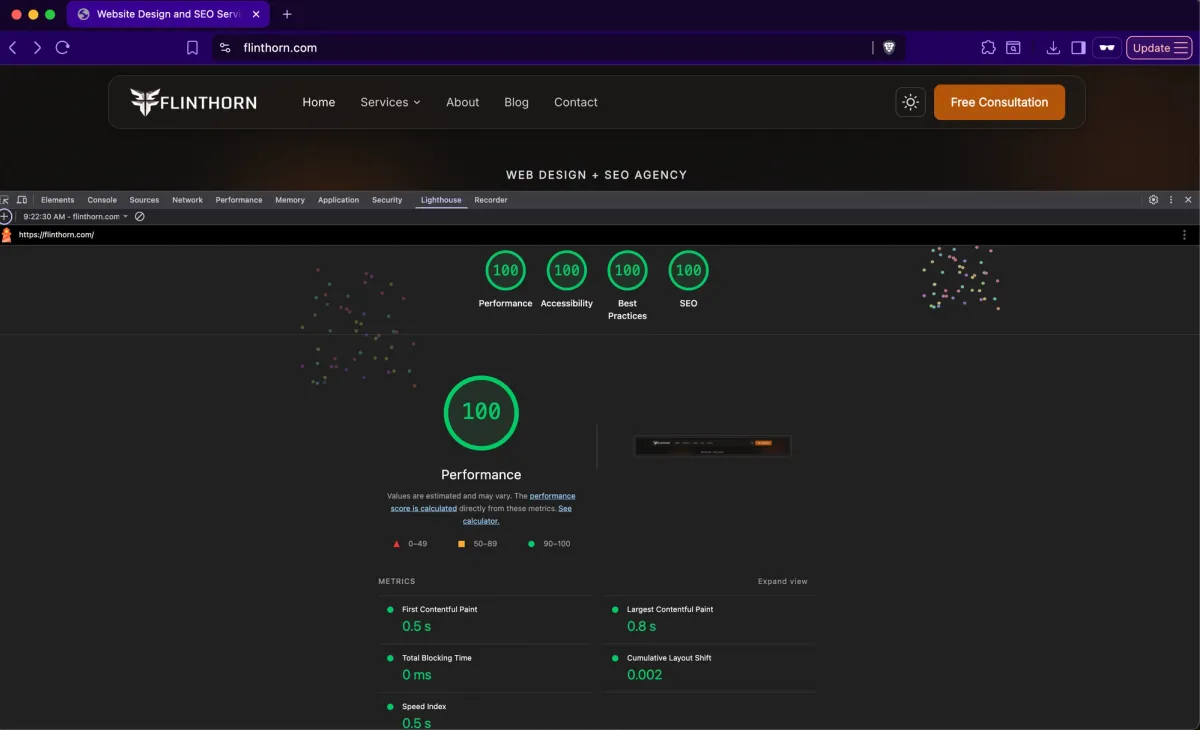
For context: our Astro sites consistently score 100 on Lighthouse Performance. The WordPress sites we've optimized typically land in the 75-90 range after significant optimization work.
SEO - More Nuanced Than It Looks
Both platforms can achieve strong SEO. The difference is in the defaults and the effort required.
Astro gives you clean semantic HTML, fast page loads (which directly affect Core Web Vitals rankings), and full control over meta tags, structured data, and sitemap generation. But you build all of it yourself or through your CMS integration. There's no Yoast-style plugin that handles SEO configuration automatically.
WordPress has excellent SEO plugins. Yoast, Rank Math, All in One SEO. These handle meta tags, sitemaps, schema markup, and content analysis out of the box. The plugin ecosystem makes SEO accessible to non-developers. But WordPress's slower page loads can hurt Core Web Vitals scores, and poorly coded themes or too many plugins can create SEO problems (render-blocking resources, bloated HTML, slow server response).
Bottom line: Astro has better SEO fundamentals by default (speed, clean HTML). WordPress has better SEO tooling by default (plugins that make optimization accessible). Both can rank well when properly built.
Content Management - WordPress Wins Here
This is WordPress's core strength. The Gutenberg block editor lets content editors create and publish pages without touching code. Media management, user roles, revision history, scheduled publishing, it's all built in.
Astro has no built-in CMS. You pair it with a headless CMS like Sanity, Contentful, or Strapi. These are powerful tools, but they're separate services with separate interfaces. The editing experience is different from what most people expect, there's no "preview exactly what the page will look like" button without custom development.
If your team publishes content frequently and includes non-technical editors, WordPress's content management experience is genuinely better out of the box. Headless CMS setups can match it, but they require more upfront development.
Security
Astro sites are static HTML files. There's no server to hack, no database to inject, no login page to brute-force, no plugins with vulnerabilities. The attack surface is essentially zero.
WordPress is the most targeted CMS on the internet, not because it's insecure by design, but because it's so widely used. Plugins are the biggest vulnerability vector. Every plugin is third-party code running on your server. WordPress requires regular updates, security plugins, login protection, and server hardening. These are solvable problems, but they require ongoing attention.
Cost
Hosting
Astro sites can be hosted for free or near-free on Cloudflare Pages, Vercel, or Netlify. Even high-traffic sites cost $0-20/month for hosting.
WordPress requires a server. Shared hosting starts at $5-15/month but performs poorly. Managed WordPress hosting (WP Engine, Kinsta, Flywheel) runs $25-100+/month for a single site.
Development
Astro development requires a developer comfortable with modern JavaScript frameworks. The developer pool is smaller than WordPress, but growing.
WordPress development has a huge talent pool and many agencies. Costs range widely, from $2,000 theme customizations to $50,000+ custom builds.
Maintenance
Astro sites need almost no maintenance. There are no plugins to update, no security patches to apply, no database to optimize. CMS updates (if using one) are managed separately.
WordPress sites need regular maintenance, core updates, plugin updates, theme updates, security monitoring, database optimization, backup management. Budget $50-200/month for ongoing maintenance, or do it yourself.
When to Choose Astro
Performance is a priority and you want fast page loads without optimization effort
Your site is primarily informational, marketing site, portfolio, documentation, blog
Security matters and you want minimal attack surface
You have a developer (or agency) comfortable with modern JavaScript
You want low hosting costs and minimal ongoing maintenance
SEO performance and Core Web Vitals scores are important to your business
When to Choose WordPress
Your team needs to publish and edit content frequently without developer involvement
You need specific functionality that WordPress plugins provide (ecommerce with WooCommerce, membership sites, LMS, booking systems)
Your budget for initial development is limited and you need to use existing themes
You want to manage the site yourself without a developer on retainer
You need a large ecosystem of integrations and extensions
Your content editors are already familiar with WordPress
What We Use at FlintHorn - And Why
We build on both platforms. Our own site runs on Astro + Sanity + Cloudflare, because performance, security, and SEO are core to what we sell, and Astro lets us deliver all three at the highest level. We score 100 across all four Lighthouse categories, and that's a direct result of the architecture.
But we also build and maintain WordPress sites for clients where it's the right fit, especially when teams need to manage content independently, when specific plugin functionality is required, or when the existing team already knows WordPress.
If you're not sure which platform is right for your project, get in touch for a free consultation. We'll give you an honest recommendation based on your actual needs.
Already on WordPress and considering a migration? Learn about our website migration process.