
Most business websites score somewhere between 40 and 70 on Google Lighthouse, the open-source tool Google uses to measure page speed, accessibility, best practices, and SEO. That range is normal, and most site owners never check. But those scores aren't abstract. They reflect real technical problems that affect how Google ranks your pages, how fast your site loads for visitors, and whether your site works at all for people using screen readers or keyboard navigation.
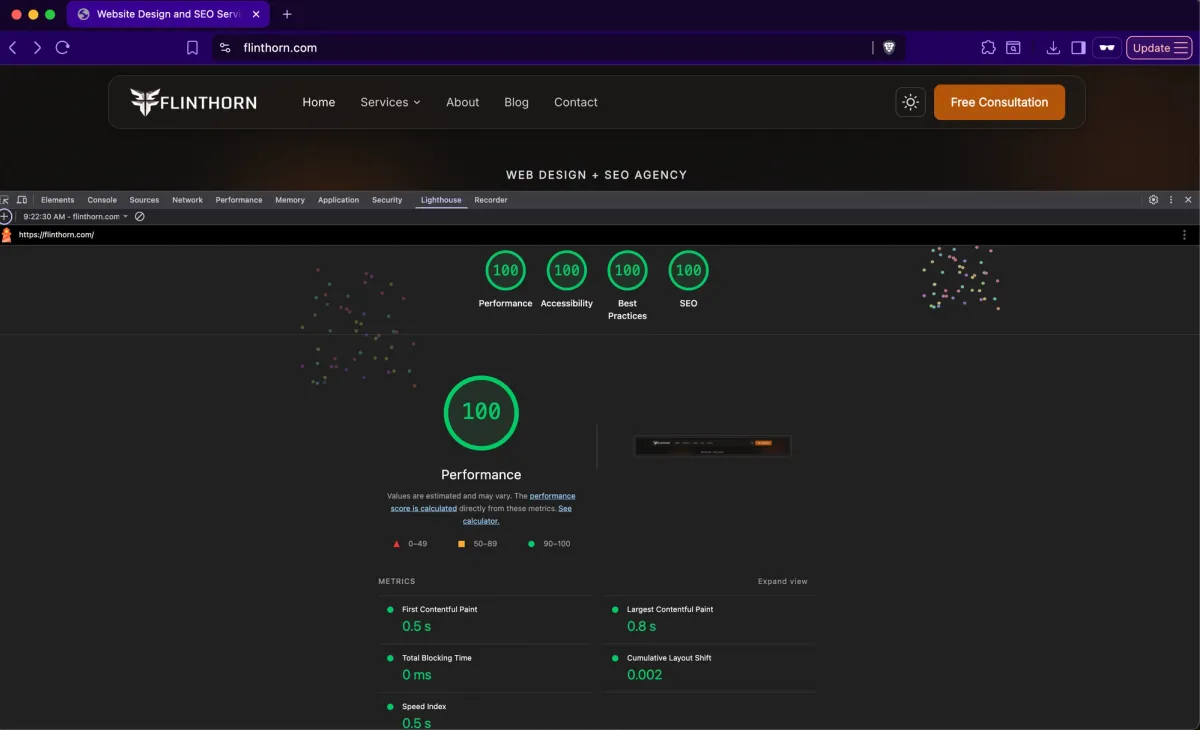
This post explains what Lighthouse actually measures, what we did to hit 100 in all four categories on FlintHorn.com, and why those same standards are built into every site we deliver.
What is Google Lighthouse and Why Should You Care?
Google Lighthouse is an automated auditing tool built into Chrome DevTools. It tests any web page across four categories: Performance, Accessibility, Best Practices, and SEO. Each category is scored 0–100. The scores are based on specific, measurable criteria, not opinions.
Most people have heard of it in passing, but few business owners understand that these scores directly influence how Google treats their site. Here's what each category actually measures and why it matters.
Performance affects your Google rankings directly
In 2021, Google rolled out Core Web Vitals as a ranking factor. Core Web Vitals measure three things: how fast the largest element on your page loads (LCP), how quickly the page responds to user input (INP), and how much the layout shifts while loading (CLS). All three are reflected in your Lighthouse Performance score.
A slow site doesn't just frustrate visitors, it tells Google your site provides a poor user experience. Google has been explicit: page experience is a ranking signal. Sites that load faster, respond faster, and don't shift around while loading get preferential treatment in search results.
Accessibility affects more visitors than you think
26% of U.S. adults have some form of disability according to the CDC. That includes visual impairments, motor impairments that make mouse use difficult, cognitive disabilities, and more. Lighthouse's Accessibility audit checks whether your site works for these users, proper heading structure, sufficient color contrast, alt text on images, keyboard navigability, and correct use of ARIA attributes.
Beyond the human impact, poor accessibility scores correlate with poor semantic HTML, which means search engines also struggle to understand your content. Accessibility and SEO are more connected than most people realize.
Best Practices and SEO scores are table stakes
The Best Practices category covers security headers, HTTPS configuration, image aspect ratios, and whether your site avoids deprecated APIs. The SEO category checks for meta descriptions, crawlable links, valid structured data, and mobile viewport configuration. These are baseline requirements, not advanced optimizations. A site that fails these checks has fundamental technical problems.
The Four 100s - What We Did and Why
When we built FlintHorn.com on our Astro + Sanity + Cloudflare stack, we set a specific target: 100 across all four Lighthouse categories. Not 90+. Not "green." 100. Here's every significant technical decision that got us there.
Performance: 100
GA4 via Partytown, zero main thread blocking.Google Analytics is one of the most common causes of poor Lighthouse Performance scores. Loaded the standard way, GA4 JavaScript runs on the main thread and contributes to Total Blocking Time, a Core Web Vitals metric. We run GA4 through Partytown, which offloads all analytics processing to a web worker. The main thread never touches it. Zero TBT contribution from analytics.
Non-render-blocking fonts.Google Fonts loaded the standard way block rendering, the browser waits for the font file before displaying text. We load fonts asynchronously using a preload and media swap pattern, and add precise @font-face fallbacks with size-adjust metrics so the fallback font matches the web font's dimensions exactly. When the web font loads in, there's no layout shift.
GPU-composited animations only.CSS animations that touch layout properties, width, height, top, left, margin, force the browser to recalculate layout on every frame. We animate exclusively with transform and opacity, the only properties that run on the GPU without triggering layout or paint. Every background animation on the site was written or rewritten to this constraint.
Astro's zero-JavaScript architecture.Astro ships pure static HTML by default, no client-side framework, no hydration overhead. Interactive elements use small vanilla JavaScript snippets. Our total JavaScript payload is under 10KB. Most React-based sites ship 200-400KB of JavaScript before any content loads. That gap shows up directly in Lighthouse Performance scores.
Edge deployment on Cloudflare.The site is pre-rendered at build time and served from Cloudflare's global edge network - 300+ locations worldwide. Time to First Byte is sub-100ms regardless of where the visitor is. TTFB is the first thing Google measures when it crawls your site.
Accessibility: 100
Semantic HTML throughout.Every component uses the correct semantic element, header, nav, main, section, article, footer. No div soup. Screen readers and search engines both rely on these elements to understand page structure. Getting this right is the foundation everything else builds on.
Dynamic heading hierarchy.Every section on our sites has a headingLevel field that editors control in Sanity, h2, h3, or h4. The hero is always h1. The document outline is correct on every page, regardless of how editors arrange sections. This matters for both accessibility and SEO. Google uses heading structure to understand content hierarchy.
Full keyboard navigation.Every interactive element, mega menu, mobile menu, dropdowns, accordions, is fully navigable by keyboard with proper aria-expanded attributes and Escape-to-close support. Lighthouse checks this. More importantly, keyboard users depend on it.
Explicit image dimensions.Every image has explicit width and height attributes. This prevents Cumulative Layout Shift, the jarring experience of content jumping as images load in. CLS is both a Lighthouse Accessibility issue and a Core Web Vitals metric. Getting it to zero requires being explicit about every image dimension across the site.
Best Practices: 100
Full security header suite.We serve a full set of security headers via Cloudflare: HSTS with preload, Content Security Policy, X-Frame-Options, X-Content-Type-Options, Referrer Policy, and Permissions Policy. These protect visitors, signal site quality to Google, and satisfy every Best Practices security audit Lighthouse runs.
CSP tuned for all third-party scripts.A Content Security Policy that's too loose provides no protection. One that's too strict breaks your analytics and third-party tools. We tuned our CSP to allowlist exactly the domains we use. Google Analytics, Sanity CDN, Google Fonts, Newt.io, Cloudflare Insights, with no console violations and no wildcards.
SEO: 100
Seven structured data types generated automatically.Organization, WebSite, LocalBusiness, BreadcrumbList, Service, BlogPosting, and FAQPage schemas are generated automatically from Sanity data on every page. Search engines use structured data to understand what your pages are about and to generate rich results, star ratings, FAQs, breadcrumbs, in search results. Most sites implement none of this or implement it incorrectly.
Dynamic XML sitemap.Our sitemap is server-rendered and queries Sanity on every build, automatically including every new page, blog post, and service page without manual maintenance. Fresh, accurate sitemaps help Google discover and index your content faster.
Crawlable navigation with proper href attributes.Every navigation link resolves to a proper href via a GROQ query, supporting internal references, external URLs, custom paths, and anchor links. No empty href values, no JavaScript-only navigation that crawlers can't follow.
Complete meta tags from Sanity.Every page has a configurable SEO title, meta description, OG image, canonical URL, and robots directives, managed in Sanity's SEO tab and rendered via a dedicated SEOHead component. No page goes live without these fields populated.
What This Means for Your Site
You don't need to build your own site to benefit from these standards. Every site FlintHorn builds is held to the same technical baseline, the same architecture, the same performance constraints, the same structured data implementation, the same security headers.
The practical outcome: sites that rank better from launch, load faster for every visitor regardless of their device or location, work correctly for users with disabilities, and give Google and AI search tools the structured signals they need to understand and surface your content.
Most agencies deliver a site that looks good in a browser. We deliver a site that scores well in a Lighthouse audit, because those scores represent real user experience, real search performance, and real business outcomes.
If you want to know how your current site scores and what's holding it back: a free technical SEO audit is a good starting point
Or if you want to see what a new site built to this standard looks like: start with a free consultation