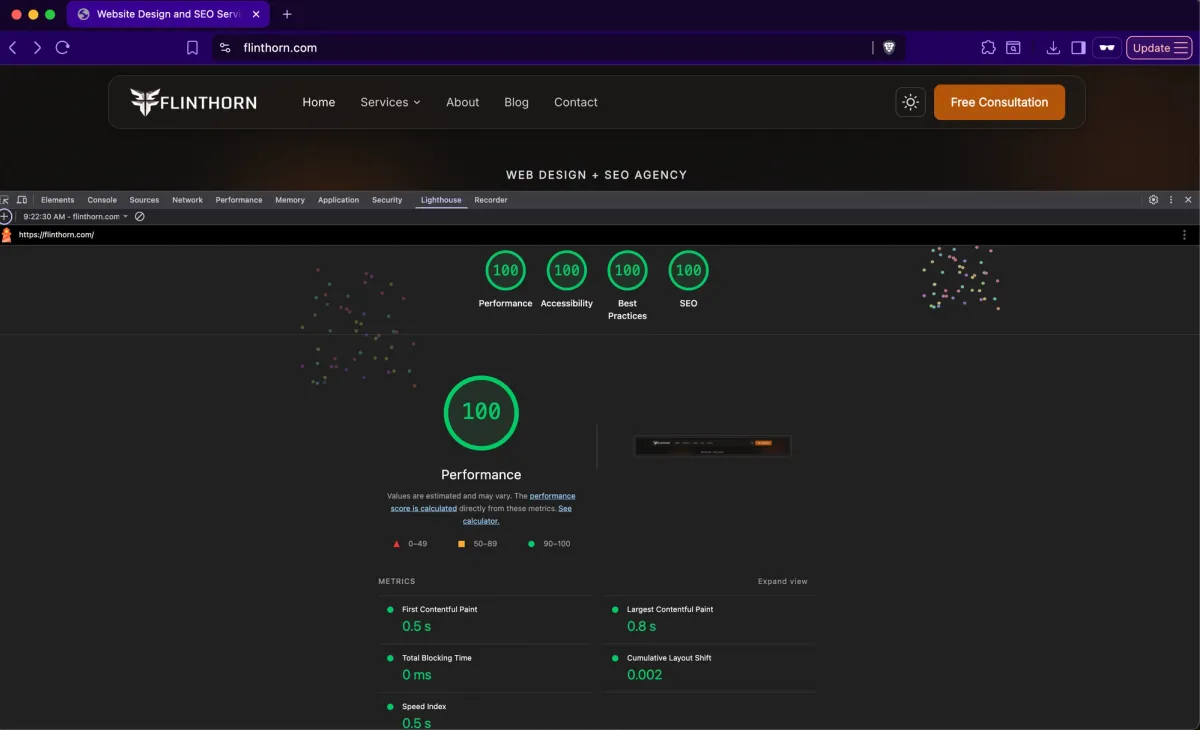


If you've looked at any SEO advice in the last few years, you've probably seen the term "Core Web Vitals." Google uses them as a ranking signal. Your developer might have mentioned them. PageSpeed Insights shows them in big colored numbers.
But most business owners don't actually know what they measure, why they matter, or what to do about them. This post gives you the practical version, what Core Web Vitals are, how they affect your rankings, and what you can realistically do to improve them.
What Core Web Vitals Are
Core Web Vitals are three specific metrics that Google uses to measure how users experience your website. They focus on loading speed, interactivity, and visual stability. Google confirmed in 2021 that these metrics are a direct ranking signal, meaning they can affect where your site appears in search results.
Largest Contentful Paint (LCP)
LCP measures how long it takes for the largest visible element on the page to load. This is usually a hero image, a large heading, or a video thumbnail. It answers the question: "How fast does the main content appear?"
Good: under 2.5 seconds. Needs improvement: 2.5-4.0 seconds. Poor: over 4.0 seconds.
LCP is the metric most directly tied to perceived speed. When a user clicks a link and waits for the page to appear, LCP is what they're experiencing.
Interaction to Next Paint (INP)
INP replaced First Input Delay (FID) in March 2024. It measures the responsiveness of your page to user interactions, clicks, taps, and keyboard inputs. Specifically, it measures the time from when a user interacts with your page to when the browser can visually respond.
Good: under 200 milliseconds. Needs improvement: 200-500 milliseconds. Poor: over 500 milliseconds.
INP matters because a page that looks loaded but doesn't respond to clicks feels broken. Heavy JavaScript is the most common cause of poor INP scores.
Cumulative Layout Shift (CLS)
CLS measures visual stability, how much the page layout shifts around while it's loading. You've experienced bad CLS: you start reading a paragraph, then an ad loads above it and pushes everything down. Or you go to tap a button and it moves right before you click it.
Good: under 0.1. Needs improvement: 0.1-0.25. Poor: over 0.25.
CLS is frustrating for users and can cause them to click the wrong thing. It's especially important on mobile, where screen space is limited and layout shifts are more disruptive.
How Core Web Vitals Affect Your Rankings
Google has confirmed that Core Web Vitals are a ranking signal, but they're not the most important one. Content relevance, backlinks, and search intent still matter more. Core Web Vitals act as a tiebreaker, when two pages have similar content quality and authority, the one with better Core Web Vitals will tend to rank higher.
That said, extremely poor Core Web Vitals can hurt you more than marginally good ones help you. If your LCP is 8 seconds and your competitor's is 2 seconds, that's a meaningful disadvantage. If your LCP is 2.4 seconds and your competitor's is 1.8 seconds, the ranking impact is minimal.
The bigger impact of Core Web Vitals is indirect: slow sites have higher bounce rates, lower engagement, and fewer conversions. These behavioral signals can affect rankings through user experience metrics that Google tracks beyond just the three Core Web Vitals numbers.
How to Check Your Core Web Vitals
Google PageSpeed Insights (pagespeed.web.dev). The most common tool. Enter your URL and get both lab data and real-user data (if available). Free.
Google Search Console. The "Core Web Vitals" report shows how your pages perform based on real user data. This is the data Google actually uses for rankings.
Chrome DevTools. The Performance tab gives you detailed lab measurements. Useful for debugging specific issues.
Lighthouse. Built into Chrome DevTools or available as a CLI tool. Runs a simulated page load and scores performance on a 0-100 scale.
Web Vitals Chrome Extension. Shows Core Web Vitals in real-time as you browse your site. Good for quick spot checks.
The Most Common Core Web Vitals Fixes
For LCP
Optimize your largest image, compress it, serve it in WebP or AVIF format, and make sure it has explicit width and height attributes.
Preload your hero image or LCP element so the browser fetches it early.
Reduce server response time, move to a faster host, use a CDN, or switch to static site generation.
Remove render-blocking JavaScript and CSS that delays the page from painting.
Use font-display: swap for web fonts so text appears immediately while fonts load.
For INP
Reduce the amount of JavaScript on the page, every KB of JS is code the browser has to parse, compile, and execute.
Break up long JavaScript tasks into smaller chunks so the browser can respond to user input between them.
Defer non-critical JavaScript with async or defer attributes.
Avoid heavy third-party scripts, analytics, chat widgets, and ad scripts are common INP killers.
Use web workers for CPU-intensive operations that don't need DOM access.
For CLS
Always set explicit width and height on images and videos so the browser reserves space before they load.
Avoid inserting content above existing content, especially ads, banners, and cookie notices that push the page down.
Use CSS aspect-ratio or min-height on containers that will be filled dynamically.
Load web fonts with font-display: swap and use size-adjust to match fallback font dimensions.
Avoid dynamically injected content that changes the layout after the page has rendered.
What Good Looks Like
A well-built website should pass all three Core Web Vitals thresholds for the vast majority of page loads. This isn't about perfection, it's about consistently delivering a fast, stable, responsive experience.
Our sites consistently hit perfect or near-perfect Core Web Vitals scores. That's not accidental, it's the result of choosing the right architecture (static site generation), optimizing images and fonts, minimizing JavaScript, and measuring performance throughout the development process.
If your site is struggling with Core Web Vitals, our technical SEO servicescan help identify and fix the specific issues dragging your scores down.
Want a site built for performance from the ground up? Learn about our web design and SEO approach.